
How to Detect Bad Survey Data Before You Trust It
A survey rarely looks “bad.”
It usually looks organized.
You see:
- A respectable number of responses
- Clean percentage breakdowns
- A few strong open-text quotes
- Maybe even a statistically significant difference
And that’s exactly why unreliable survey data is dangerous.
Low-quality data does not announce itself. It quietly sits inside dashboards and slide decks — shaping decisions with the appearance of objectivity.
If the previous discussion was about the cost of bad survey data, this is about the forensic work: how to detect it before it misleads you.
This isn’t about turning product teams into academic researchers. It’s about understanding a few fundamental warning signs that survey methodology research has identified repeatedly over decades.
Start by questioning the sample, not the percentages
The first instinct when looking at survey results is to interpret the answers.
A better first instinct is to ask:
Who answered — and who didn’t?
Survey research has long emphasized that nonresponse bias occurs when respondents differ meaningfully from nonrespondents. Groves (2006) makes this clear: low response rates do not automatically create bias — but differences between respondents and nonrespondents do.
In practice, this means you should ask:
- Are heavy users overrepresented?
- Did highly dissatisfied users respond at higher rates?
- Did certain segments (e.g., new customers, mobile users, international users) respond less?
If your survey invitation went to 5,000 users and 400 responded, that’s not inherently bad. But if those 400 skew toward a specific behavioral group, your averages are misleading.
A simple diagnostic: Compare respondent characteristics to your known population metrics. If they diverge significantly, you likely have bias.
Look at completion time distribution — not just average time
Completion time is one of the most underused quality signals.
Many teams glance at “average time to complete” and move on. That number hides important variation.
Instead, look at:
- The distribution of completion times
- The fastest 10%
- The slowest 10%
- Clusters of extremely short completions
Research on satisficing shows that respondents often reduce cognitive effort when burden increases. Low-effort responding can inflate reliability measures while reducing true data validity.
If a meaningful share of respondents completed your 10-minute survey in 1–2 minutes, you likely have:
- Skimming
- Straightlining
- Random or patterned responses
Short time-to-complete does not automatically invalidate a response. But a cluster of extremely fast completions is a red flag.
Identify straightlining and patterned answering
Straightlining occurs when respondents select the same option across grid or scale questions.
For example: Strongly Agree Strongly Agree Strongly Agree Strongly Agree
This can reflect genuine opinion — or cognitive fatigue.
Survey methodology literature documents how respondents use heuristics to minimize effort under cognitive load (Tourangeau, Rips, & Rasinski, 2000).
While not all straightlining is invalid, high frequency combined with short completion time strongly suggests low engagement.
If your dataset shows:
- Minimal variance across complex scales
- Uniform answers across unrelated items
- Identical answer patterns repeated
You should question response quality.
Examine drop-off at the question level
Most dashboards report:
- Total responses
- Total completions
Few highlight:
- Where respondents exited
Question-level drop-off analysis can reveal:
- Confusing wording
- Sensitive questions
- Excessive open-text burden
- Mobile usability issues
AAPOR and federal survey methodology guidelines emphasize understanding survey process errors — not just final response counts.
If 30% of respondents exit at Question 7, the data from Questions 8–15 reflect a systematically narrower subgroup.
That means your later questions are answering: Not “what do users think?” But “what do persistent users think?”
That distinction matters.
Watch for polarization and extreme clustering
Surveys that produce highly polarized distributions may reflect:
- True divided opinion
- Sampling imbalance
- Question wording bias
- Social desirability bias
If your survey shows:
- Extremely high agreement rates (e.g., 92% “very satisfied”)
- Extreme clustering at ends of scale
- Minimal middle-range responses
Investigate whether:
- The scale was balanced
- The wording nudged respondents
- Only highly engaged users responded
Pew Research repeatedly highlights the importance of question design and scale construction in minimizing measurement error.
High agreement is not automatically a success metric. Sometimes it signals sample skew.
Evaluate open-text dominance carefully
Open-text responses are persuasive because they feel authentic.
But they are often:
- Written by highly motivated respondents
- Longer among extreme opinions
- Sparse among moderate users
This creates what can be described as “echo amplification.”
A few strong voices dominate qualitative perception, even if they represent a small fraction of respondents.
A practical check: Compare the distribution of quantitative answers among those who wrote long comments versus those who didn’t.
If open-text respondents skew strongly negative or positive, be careful about generalizing their narrative tone to the entire population.
Test internal consistency across related questions
If your survey includes:
- Satisfaction scale
- Likelihood to recommend
- Perceived value
Look for logical coherence.
For example: High satisfaction but low likelihood to recommend High value but low usage intention
Inconsistency can indicate:
- Confusion
- Misinterpretation
- Random responding
While human attitudes are complex, systematic inconsistency across a large share of responses often signals measurement problems.
Be willing to discard data
This is the most uncomfortable recommendation.
Sometimes the correct decision is: Run it again.
If:
- Drop-off is extreme
- Completion times suggest low effort
- Sample skews heavily
- Question wording was flawed
It is better to re-field a shorter, cleaner survey than to rationalize weak data.
Professional research standards emphasize transparency in reporting limitations and bias risks.
Most product teams skip this step because:
- They already presented findings
- They feel pressure to decide
- “Some data is better than none”
But misleading data can be worse than uncertainty.
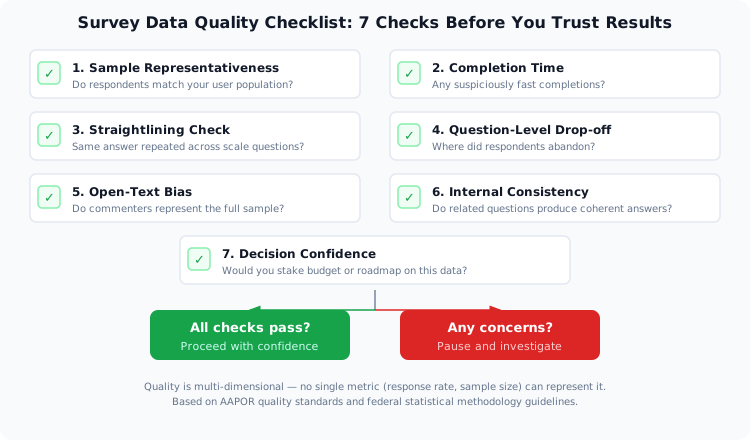
A simple pre-decision checklist
Before acting on survey results, ask:
- Does the respondent sample resemble the broader population?
- Are there suspicious clusters in completion time?
- Is straightlining present at high frequency?
- Where did respondents drop off?
- Do open-text respondents represent the broader sample?
- Are related questions internally coherent?
- Would I stake budget, hiring, or roadmap on this confidently?
If any of these answers raise concern, pause.
Why this matters more than ever
Survey data increasingly informs:
- Product roadmaps
- Marketing messaging
- Pricing changes
- Customer success initiatives
- Executive reporting
As response rates decline across many survey environments and attention spans shorten, quality assurance becomes more important — not less.
The irony is this:
The easier surveys become to create, the easier it becomes to create misleading data.
The real competitive advantage is not collecting more responses.
It’s knowing when your data deserves trust.
A practical next step
Before your next survey goes live:
- Pilot it internally and examine completion time variance.
- Review each question for cognitive burden.
- Limit open-text to only what is essential.
- Plan how you will evaluate drop-off before you collect data.
If your survey platform allows you to preview flow, test mobile rendering, and monitor completion signals, use those tools deliberately before distribution.
Better data is rarely about asking more.
It’s about measuring more carefully.
References
- Groves, R. M. (2006). Nonresponse Rates and Nonresponse Bias in Household Surveys. Public Opinion Quarterly.
- Hamby, T. (2016). Survey Satisficing Inflates Reliability and Validity Measures.
- Pew Research Center. Survey Methodology and Bias Reduction.
- Pew Research Center (2018). Reducing Bias on Benchmarks.
- AAPOR (2016). Reassessing Survey Methods in the Digital Age.
- Federal Committee on Statistical Methodology (2023). Best Practices for Nonresponse Bias Reporting.
— The SurveyReflex Team